The Episode Recap That Gives Away Too Much
Episode recap spoilers can turn a helpful catch-up into a clue about the next twist. Learn how to choose the right summary and stop at the safe point.
You open an episode recap to remember why two characters stopped speaking, then spot a phrase about a hidden alliance halfway down the page. Episode recap spoilers often arrive this way: not in a warning, but in a summary that reaches beyond the moment you have watched. A recap can help you recover a story without taking away its next turn, but only if you choose a format and stopping point that match your place in the series.
Why can a recap spoil more than the episode itself?
A recap is written after its episode has aired, and its author may assume the reader has finished watching. That changes what counts as relevant. A detail that was merely suggestive during the episode can be described as a confirmed fact in the recap, and a character’s apparently minor choice may be explained in the light of a later reveal.
The risk grows when an article covers a whole season, a group of episodes, or the series to date. Search results may display a later episode’s title or a sentence from the page. A link labelled “recap” can lead to a page with a season-wide introduction, while a video summary may include clips from the ending before its first spoken line.
There is also a difference between recalling what happened and interpreting what it means. “Mara leaves the station” is an event. “Mara has chosen the rival’s side” is an interpretation that may answer a question the story intends to leave open. A recap can spoil by stating the interpretation, even if it never names a later event.
What causes a recap to cross your episode boundary?
The most common cause is a mismatch between the recap’s scope and your viewing point. A page titled with the series name may discuss several seasons, while a search result for one episode can draw from the article’s opening paragraph, which may reveal where the season eventually leads. A streaming platform’s “previously on” segment can also include material selected to prepare for the episode you are about to watch, rather than to remind you only of the previous one.
Other clues come from how the recap is presented. A headline such as “The truth about the captain’s disappearance” may disclose that the question has an answer. A thumbnail can show a character in a setting they have not yet reached. Comments, recommended videos and “next episode” links may expose discussion of later turns.
None of these features is automatically unsafe. The useful question is whether the material is limited to the episode you have completed, and whether its headline, opening and surrounding page obey that limit. If the page does not make the boundary clear, treat the uncertainty as a reason to choose another source rather than scrolling further.
How can you choose a recap that stops at the right point?
Start with the episode number or title, not a broad search for the series. Look for a recap explicitly devoted to that single episode and check its date or episode label before opening it. If a site offers spoiler settings, select the option that limits discussion to your current episode; do not assume a general “spoiler-free” label means the same thing on every site.
Then inspect the preview without reading beyond it. A search snippet that mentions a later character, a new location or a resolved mystery is a useful signal to leave the result alone. Search within a streaming service’s episode guide, where available, may be safer than a general web search, but platform descriptions can still contain material intended to promote the season as a whole.
For a recap you already trust, use its navigation deliberately. Choose the specific episode from a contents list, and avoid the season overview, “what to remember” box or related-story links. If the site places the recap below a long introduction, use the page’s contents link rather than scrolling past headlines and images that may reveal later developments.
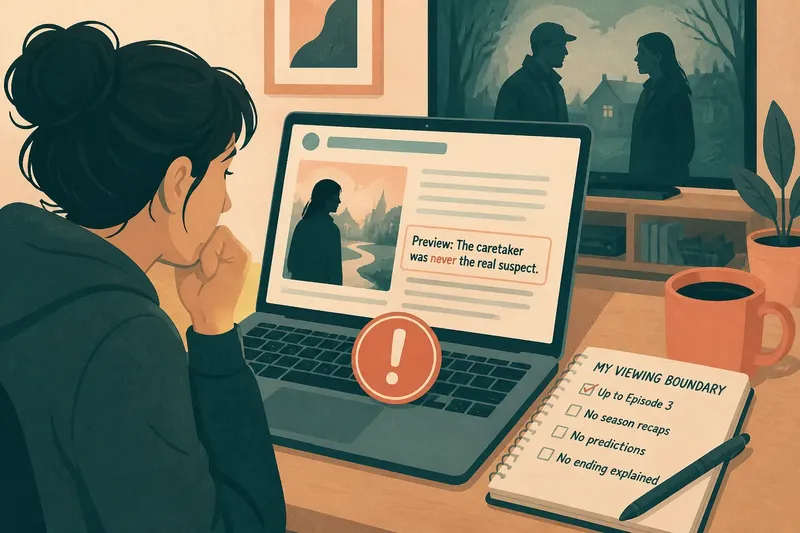
Imagine you have finished the third episode of a mystery and cannot remember why the caretaker was questioned. You find a page labelled for that episode, but its preview says the caretaker “was never the real suspect”. That wording has already changed the question you would carry into the next episode. Close the page and seek a recap that describes the interview itself, or check the episode’s own subtitles for the line you missed; the expected result is a reminder of the scene without a verdict about its meaning.
What should you try when a recap has already revealed something?
Stop reading as soon as you notice the boundary has been crossed. Continuing to scan for context often adds more clues, while the useful information you wanted may already be lost. Do not search the revealed phrase to find out whether it is important; search results can attach the phrase to later recaps and discussion.
Instead, separate the claim from what you know. If a recap says a character has betrayed someone, note that the recap asserts this, not that the episode has shown it. The wording may reflect an interpretation, a later episode, or an editorial simplification. This distinction does not erase the spoiler, but it can keep a suggestive statement from becoming an unquestioned fact in your mind.
When you resume watching, pay attention to what the episode actually confirms. A character’s action, a line of dialogue and another character’s reaction are different kinds of evidence. You do not need to reconstruct the whole plot around the leaked phrase. Let the scene supply its own context, and resist checking a fan discussion until you reach the same point as its contributors.
It is not worth trying to “unsee” a spoiler by reading more explanations or looking up whether it was accurate. That usually adds detail and may confirm the reveal. A short pause, followed by returning to the episode, is often a better use of attention than searching for a way to cancel what you read.
How can you make recaps safer to use next time?
Set a boundary before searching: the latest episode you have completed is the furthest point you want any summary to cover. Then keep the recap narrow and avoid pages that mix episode discussion with season predictions. These habits are simple, but they work best when you treat titles and previews as part of the content, not as harmless packaging.
- Check the episode label. Confirm that the page names the exact episode you have finished. If it says “season recap” or “ending explained”, choose a different result.
- Read the preview first. If it mentions a later location, a relationship change or an answer to an open question, do not open that page.
- Prefer scene reminders to verdicts. A recap that says who entered a room and what was said is less likely to decide what an ambiguous action means.
- Use chapter links. Jump to the episode section rather than passing through a season introduction or a list of upcoming episodes.
- Keep autoplay and recommendations in mind. Turn off autoplay if the next episode’s preview could reveal its opening, and avoid clicking suggested videos before you are ready.
- Choose a stopping point. Once the recap has answered the question you came with, close it instead of reading comments or adjacent coverage.
These checks do not require a perfect spoiler policy from every publisher. They give you a practical way to judge whether a particular page is safe for your current point in the story. If you watch with someone who is further ahead, ask them to name the episode boundary before sharing a link or summary.
Which recap details are safe to read, and which are not?
Is a plot summary safer than an episode review?
Not necessarily. A plot summary may recount the ending in detail, while a review may discuss only the premise and craft. Check the page’s scope and wording rather than relying on its label.
Can a recap of an earlier episode contain later spoilers?
Yes. A writer may revise an older recap after a later reveal, or add a season-wide note that explains an earlier scene. Look for language that confirms a character’s motive or says what an earlier clue “really meant”.
Are official streaming summaries always safe?
No. An episode description may be written to encourage viewing and can mention a major set-up or consequence. Read only the description for the episode you have completed, and treat previews for upcoming episodes as promotional material rather than neutral reminders.
What can I use instead of a recap?
Try the episode’s subtitle track, a personal note with character names and unresolved questions, or a brief message to a friend who is at the same point. Each can help recover a detail without inviting a broader account of what happens later.
How do you return to the story without chasing spoilers?
Once you have the missing detail, put the recap away and let the next episode re-establish its own questions. If you are still unsure, carry the uncertainty forward rather than searching for a definitive explanation. Some confusion is intentional, and a later scene may clarify it without outside help.
For episode recap spoilers, the safest habit is not to avoid summaries altogether; it is to control their scope. Search for the episode you have finished, inspect the preview, use only the section you need, and stop before the page starts interpreting beyond it. That keeps a recap in its proper role: a reminder of the story so far, not a shortcut to the story’s next turn.